
Verkh

Stuck at p=none? Most domains never make it past it.

Most domains with DMARC are stuck in monitoring mode. Verkh shows you exactly when it’s safe to advance — and exactly which sender is keeping you stuck.

Start Pro — See My Readiness Score

Pro is $99/month. Free tier available for one domain.

Why you’re stuck

It’s almost never the DNS record. It’s the three problems underneath it.

Vendors won't fix their auth

You opened a SendGrid ticket six weeks ago. Your CRM admin is on PTO. Marketing keeps adding new tools without telling you. Every unauthenticated source is one more reason you can't move to enforcement.

You can't tell legit traffic from spoofing

Aggregate XML reports give you IPs and pass/fail counts — not whether the failing source is your finance team's e-signature tool or an attacker. Without that, moving to p=reject is a coin flip.

No one tells you when it's safe to advance

Most tools show you a dashboard and stop. The decision to flip from p=none to p=quarantine sits with you, alone, with no readiness threshold and no rollback plan.

The pattern we hear most

Teams come to us after 12–24 months at p=none, holding because nobody can tell them when it’s safe to advance.

How Verkh moves you safely

Policy progression isn’t a button. It’s a workflow with guardrails.

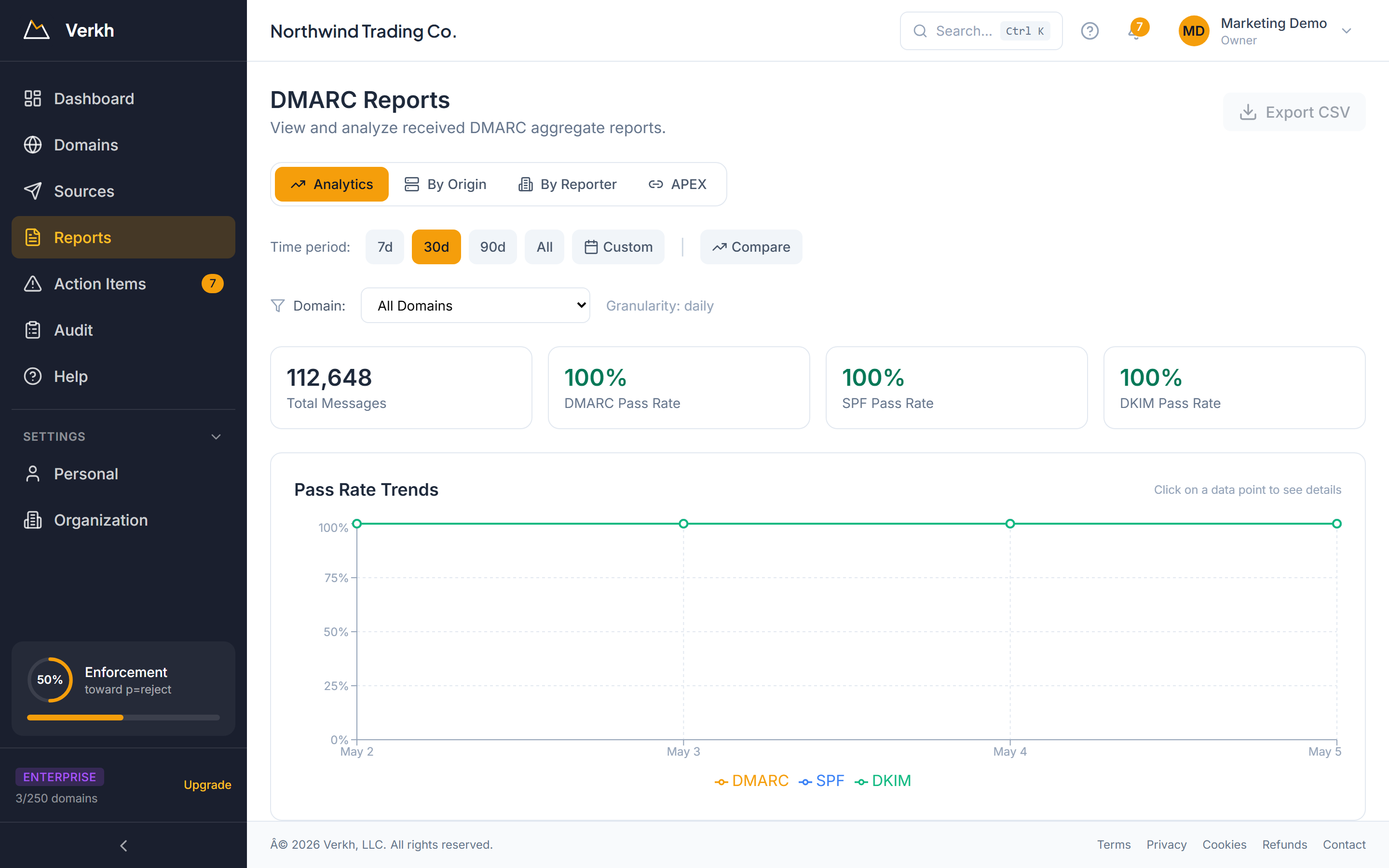
Verkh DMARC Reports dashboard showing 30-day pass-rate trends, total messages, DMARC/SPF/DKIM pass rates, and an enforcement progress indicator in the sidebar tracking the path toward p=reject.
  • A readiness gate, not a green button: 30 days at 95%+ pass rate with zero unauthorized senders
  • Per-sender pass-rate breakdown so you can see exactly which source is blocking the next step
  • Plain-language risk summary before every policy change
  • pct= rollout guidance — apply the new policy to only 10% of failing mail at first, raise as confidence grows

We don’t recommend p=quarantine until your authenticated pass rate holds at 95% or higher for 30 straight days with zero unauthorized senders left in the report stream — so the move is data-backed, not a guess.

Want the deeper explainer of what to publish at each stage? See the complete DMARC policy guide — real-world record patterns by org type, the 12 most common pitfalls, and a per-DNS-provider publishing reference.

What changes in week 1

You won’t reach p=reject in seven days. But you’ll know exactly how to get there.

  1. Day 1

    Connect your domain

    Add one DNS TXT record. Verkh starts ingesting your aggregate reports the same day.

  2. Day 2–3

    Every sender, identified

    We auto-classify SendGrid, Microsoft 365, Mailchimp, HubSpot, Salesforce, and 25+ others. Unknown IPs get flagged, not buried.

  3. Day 4–5

    Copy-paste fixes for the failing sources

    For each failing sender, you get the exact SPF or DKIM record to add — and a shareable page to send the vendor when they ask.

  4. End of week 1

    A clear path to p=quarantine

    The readiness panel shows where you stand against the 30-day / 95% gate and which senders are still pulling the score down. Most teams clear the gate within 4–12 weeks.

DMARC: should you set p=none, p=quarantine, or p=reject?

The three policies aren’t alternatives — they’re a progression. Here’s what each one tells receiving servers to do, and when you should be at each stage.

p=none

Monitoring only

What it does

Receiving servers deliver every email normally and send you aggregate reports about who passed and who failed authentication. No mail is blocked or filtered.

When you should be here

You should be here for 30+ days while you discover every legitimate sender and clean up SPF/DKIM. Most domains never leave this stage — that’s the whole problem.

p=quarantine

Send failures to spam

What it does

Mail that fails DMARC alignment gets routed to the recipient’s spam or junk folder instead of the inbox. Legitimate senders that aren’t fully authenticated will start landing in spam.

When you should be here

Move here once your authenticated pass rate sits at 95%+ for 30 straight days with zero unauthorized senders. Use pct=10 first, raise as the data holds.

p=reject

Block failures outright

What it does

Receiving servers reject failing mail at the SMTP layer — it never reaches the recipient at all. This is what spoofers see when they try to send as your domain.

When you should be here

The end goal. Move here after at least two weeks at p=quarantine with no surprise sender failures. This is also the policy required for BIMI logos and most mature compliance standards.

Common questions

What does DMARC disposition 'none' mean?

Disposition is what the receiving mail server actually did with a message. A disposition of 'none' means the server delivered the message normally — it took no action, even if the message failed authentication. This is distinct from the DMARC policy p=none, which is the instruction you publish. p=none tells receivers “do nothing on failure,” so you'll see disposition=none for every failing message in your aggregate reports until you advance the policy.

What's the difference between p=none, p=quarantine, and p=reject?

All three are DMARC policies that tell receiving servers what to do with email that fails authentication. p=none means deliver everything normally and just send aggregate reports — it provides zero protection. p=quarantine means route failing mail to the recipient's spam or junk folder. p=reject means block failing mail at the SMTP layer so it never reaches the recipient. The intended progression is none → quarantine → reject, advancing only when your data shows it's safe.

Should I move from p=quarantine to p=reject?

Yes — once your authenticated pass rate stays at 95% or higher for at least two weeks at p=quarantine with no surprise sender failures and no spam-folder complaints from internal users. p=reject is the policy that actually stops domain spoofing at the SMTP layer and is required for BIMI logos in Gmail/Apple Mail. Staying at quarantine indefinitely leaves a gap: spammers can still get failing mail into spam folders, and recipients sometimes fish those messages out.

How is this different from the free DMARC reporting in Microsoft 365 or Google Workspace?

Microsoft and Google forward you the raw aggregate XML reports they receive. They don't aggregate across senders, classify which IP belongs to which vendor, score your readiness, or recommend the next policy step. You still have to read the XML, build the spreadsheet, and decide when to advance — alone. Verkh does the workflow on top of those reports.

What happens to my data if I cancel?

Nothing dramatic. Cancelling Pro drops you to the Free tier — no charge, no credit-card prompt. Your historical data stays in your account at the Free tier's retention limit, and you can re-upgrade whenever you want without losing anything that's still inside that window.

Stop watching reports. Start moving.

Connect your domain in 60 seconds. See your readiness score before lunch.

Start Pro — See My Readiness Score